Every website needs an HTTPS encrypted connection. This isn’t just a nice-to-have anymore. It’s essential for security, SEO, and user trust. If your site still runs on HTTP, you’re losing visitors and rankings.
Let’s explore what HTTPS means and why it matters for your WordPress site.
What Is HTTPS Encrypted Connection?
HTTPS stands for Hypertext Transfer Protocol Secure. It’s a combination of regular HTTP with SSL/TLS encryption. The “S” at the end means “Secure.”
Here’s how it works:
SSL uses two keys for encryption. The public key encrypts data on the visitor’s computer. This scrambled data travels to your server. Your server uses the private key to decrypt and read it.
Only your server has the private key. Even if someone intercepts the data mid-transmission, they can’t read it. The encryption makes it meaningless garbage to anyone without the key.
HTTP uses port 80. HTTPS uses port 443. The different ports help servers handle secure and insecure traffic separately.
Reason 1: Security
Without encryption, data travels in plain text. Anyone monitoring the connection can read everything. This includes passwords, credit card numbers, and personal information.
Public WiFi makes this especially dangerous. Hackers can easily intercept traffic on coffee shop or airport networks. One session on an HTTP site could expose sensitive information.
HTTPS protects against:
- Eavesdropping – No one can read the encrypted data
- Man-in-the-middle attacks – Hackers can’t insert themselves into the connection
- Data tampering – Content can’t be modified in transit
- Impersonation – SSL certificates verify site identity
Your visitors want protection. They trust sites with HTTPS. They avoid sites without it.
Reason 2: SEO Rankings
Google announced HTTPS as a ranking factor in 2014. Secure sites get a small boost in search results. Over time, this advantage has grown.
Google wants a secure web. They reward sites that help achieve that goal. All else being equal, HTTPS sites rank above HTTP sites.
The SEO benefit compounds with user behavior. Visitors trust HTTPS sites more. They stay longer. They engage more. These signals further improve rankings.
If competitors have HTTPS and you don’t, they have an advantage. Every day without SSL costs you potential traffic.
Reason 3: Browser Warnings
Starting with Chrome 68, Google marks all HTTP sites as “Not Secure.” This warning appears in the address bar. Visitors see it immediately.
Firefox, Safari, and Edge show similar warnings. The label scares visitors. Many leave without reading your content.
The warnings will only get more prominent. Browser makers are committed to pushing the web toward HTTPS. Sites without SSL look outdated and risky.
Sites with SSL show a padlock icon instead. This visual cue builds trust. Visitors feel safe entering information.
Reason 4: E-Commerce Requirements
Online stores absolutely require HTTPS. Payment processors won’t work without it. PCI compliance standards mandate encrypted connections.
Even if you don’t sell products directly, you might have:
- Donation forms
- Membership signups
- Contact forms collecting personal information
- User registration
Any form collecting sensitive data should use HTTPS. It’s not just best practice—it’s often legally required.
SSL Certificate Types and Costs
SSL certificates come at various price points:
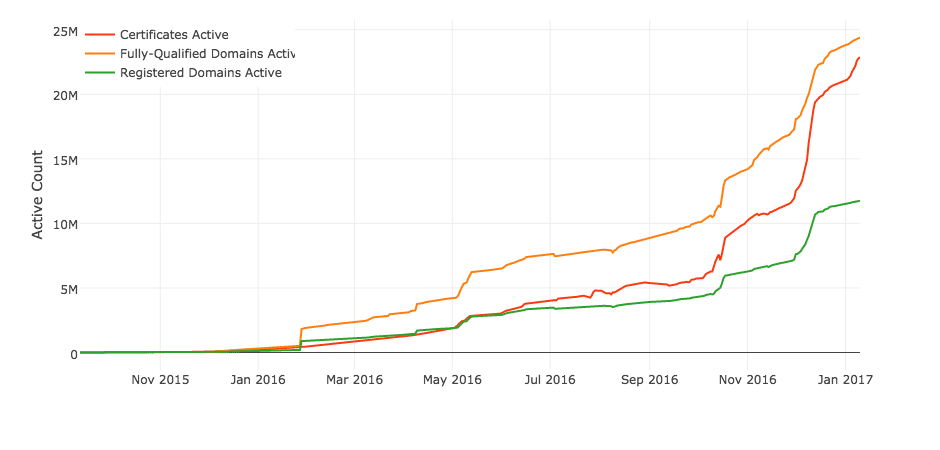
Free (Let’s Encrypt) – Basic encryption, automatically renewed. Perfect for most websites. Supported by major companies including Google and Facebook.
DV Certificates ($10-400) – Domain Validation. Proves you own the domain. Quick to obtain. Good for most websites.
OV Certificates ($50-1,000) – Organization Validation. Verifies your business exists. Requires documentation. Takes longer to issue.
EV Certificates ($190-1,500) – Extended Validation. Highest trust level. Shows company name in browser. Required manual verification. Can increase conversions by 3%.

The main difference between free and paid? Warranties. Higher-priced certificates include larger warranties if something goes wrong. For most sites, free certificates work perfectly.
Getting Your SSL Certificate
The easiest option is hosting that includes free SSL. WPlook Hosting provides free SSL certificates with every plan. Installation is automatic.
If you need to purchase separately, SSL certificates are available here. Prices fit any budget.
After getting your certificate:
- Install the certificate on your server
- Update WordPress to use https://
- Set up redirects from http:// to https://
- Fix any mixed content warnings
- Update Google Search Console
Certificate Expiration Warning
SSL certificates expire. Most last 1-2 years. Let’s Encrypt certificates expire after 90 days but renew automatically.
An expired certificate is worse than no certificate. Browsers show scary red warnings. Visitors can’t access your site without clicking through security alerts.
Set calendar reminders to renew before expiration. Most providers send email warnings, but don’t rely solely on those.
Make the Switch Today
HTTPS is no longer optional. Security, SEO, and user trust all require it. The cost is minimal—often free. The benefits are substantial.
Every day without HTTPS costs you visitors, trust, and rankings. Make the switch and join the secure web.
Need help? Contact us for assistance with SSL setup.
Frequently Asked Questions
What is the difference between SSL and TLS?
TLS (Transport Layer Security) is the successor to SSL (Secure Sockets Layer). TLS is more secure and is what websites actually use today. However, people still say “SSL” out of habit. When you buy an “SSL certificate,” you’re actually getting TLS encryption.
Do I need SSL if I don’t collect payments?
Yes. SSL protects all data, not just payments. Contact forms, login credentials, and even browsing habits should be encrypted. Browsers also show warnings on sites without SSL, which drives visitors away regardless of what your site does.
Will SSL slow down my website?
Modern SSL adds negligible overhead. The encryption process takes milliseconds. In fact, HTTPS enables HTTP/2, which actually makes sites faster through better connection handling. Any minor SSL overhead is offset by HTTP/2 benefits.
How do I know if my SSL certificate is working?
Check your browser’s address bar. You should see a padlock icon and “https://” before your domain. Click the padlock to view certificate details. Online tools like SSL Labs can test your certificate configuration and identify any issues.
What happens if my SSL certificate expires?
Browsers display scary warning pages that block access to your site. Visitors see messages about security risks. Most won’t proceed past these warnings. Set calendar reminders to renew before expiration. Let’s Encrypt certificates renew automatically if configured properly.
Can I get a free SSL certificate?
Yes. Let’s Encrypt provides free SSL certificates that work for most websites. Many hosting providers include free SSL through Let’s Encrypt. Free certificates provide the same encryption as paid ones. Paid certificates add warranties and trust badges for e-commerce sites.
Get SSL Certificate Get Hosting with Free SSL Encrypted Connection, Security, SSL, WordPress
Thanks for the informative update about the reasons why one should use an HTTPS encrypted connection for a website or blog. This is really helpful. Keep it up!
HTTPS is commonly denote a secured site. Users who have less technical info, prefer to browse only quality sites.