
Patients Google their symptoms before calling a doctor. They read reviews before booking an appointment. And if your practice does not have a healthcare website, you are invisible to the people who need you most. A 2024 survey by the Pew Research Center found that 80% of internet users have searched for health-related information online. Your next patient is searching right now — the question is whether they find your practice or your competitor’s.
I have been building WordPress websites for over 15 years, and healthcare is one of the industries where a good website makes the biggest difference. Patients are not just browsing. They are making decisions about their health, and they need to trust you before they walk through your door. WordPress gives you the tools to build that trust without the cost of custom development. If you are new to the platform, start with our guide to starting a WordPress website for the initial setup, then come back here for the healthcare-specific strategy.
Why Your Healthcare Practice Needs a Website
A decade ago, patients found doctors through referrals and the Yellow Pages. That world is gone. Today, 77% of patients use search engines before booking a medical appointment, according to a Google health study. If your practice is not showing up in those searches, you are losing patients to competitors who are.
Trust starts online. Patients judge a medical practice by its website. A professional, well-organized site signals competence. An outdated site — or no site at all — signals the opposite. Fair or not, that is how people evaluate healthcare providers in 2026.
Online scheduling is expected. Patients no longer want to call during business hours and wait on hold. They want to book appointments at 11 PM from their couch. A healthcare website with built-in scheduling meets patients where they are and reduces the workload on your front desk staff.
Patient education builds loyalty. When you publish helpful content about conditions, treatments, and preventive care, two things happen. Patients trust you more because you are giving them real value. And Google starts sending you more traffic because you are answering the questions people are actually searching for. This is how small practices compete with large hospital systems online.
Competitive advantage is real. Many private practices still rely on directory listings or basic profile pages. A dedicated WordPress site puts you miles ahead. You control the design, the content, and the patient experience. That control translates directly into more appointments and better patient relationships.
Choose the Right Hosting for a Healthcare Website
Healthcare websites have higher standards than a typical blog or portfolio site. Your hosting needs to deliver on three non-negotiable requirements: reliability, speed, and security.
Uptime matters more in healthcare. If a restaurant website goes down for an hour, it is an inconvenience. If a medical website goes down, a patient who needs urgent care cannot find your phone number or address. Choose hosting that guarantees 99.9% uptime or better.
SSL certificates are mandatory. Every healthcare website must run on HTTPS. Patients need to see that padlock icon in their browser, especially if they are submitting contact forms with personal information. Most quality hosting providers include free SSL certificates. Do not settle for one that does not.
Speed affects patient perception. A slow website feels unprofessional. Google also uses page speed as a ranking factor, so a fast site ranks higher in search results. Look for hosting with SSD storage, server-level caching, and a content delivery network (CDN). For healthcare practices, I recommend managed WordPress hosting because it handles updates, backups, and security patches automatically. You have enough on your plate running a medical practice. We compared the best WordPress hosting providers if you want to see specific recommendations and pricing.
A note on HIPAA compliance: Standard WordPress hosting is fine for informational websites, contact forms, and appointment requests. However, if you plan to handle protected health information (PHI) — patient records, medical histories, or billing data — through your website, you need HIPAA-compliant hosting specifically. For most private practices, a standard healthcare website that collects names, phone numbers, and appointment preferences does not require HIPAA-compliant hosting. But consult with a compliance expert if you are unsure.
Pick a WordPress Theme Built for Healthcare
Generic business themes can technically work for a medical practice, but you will spend weeks trying to make them do things a healthcare-specific theme does out of the box. Doctor profiles, department pages, appointment booking forms, medical service listings — these features are essential, and a purpose-built theme includes them from day one.
The theme I recommend for healthcare websites is Health & Medical. I built it specifically for hospitals, clinics, and private practices, and it includes every feature a medical website needs without the bloat that slows most themes down.
Health & Medical
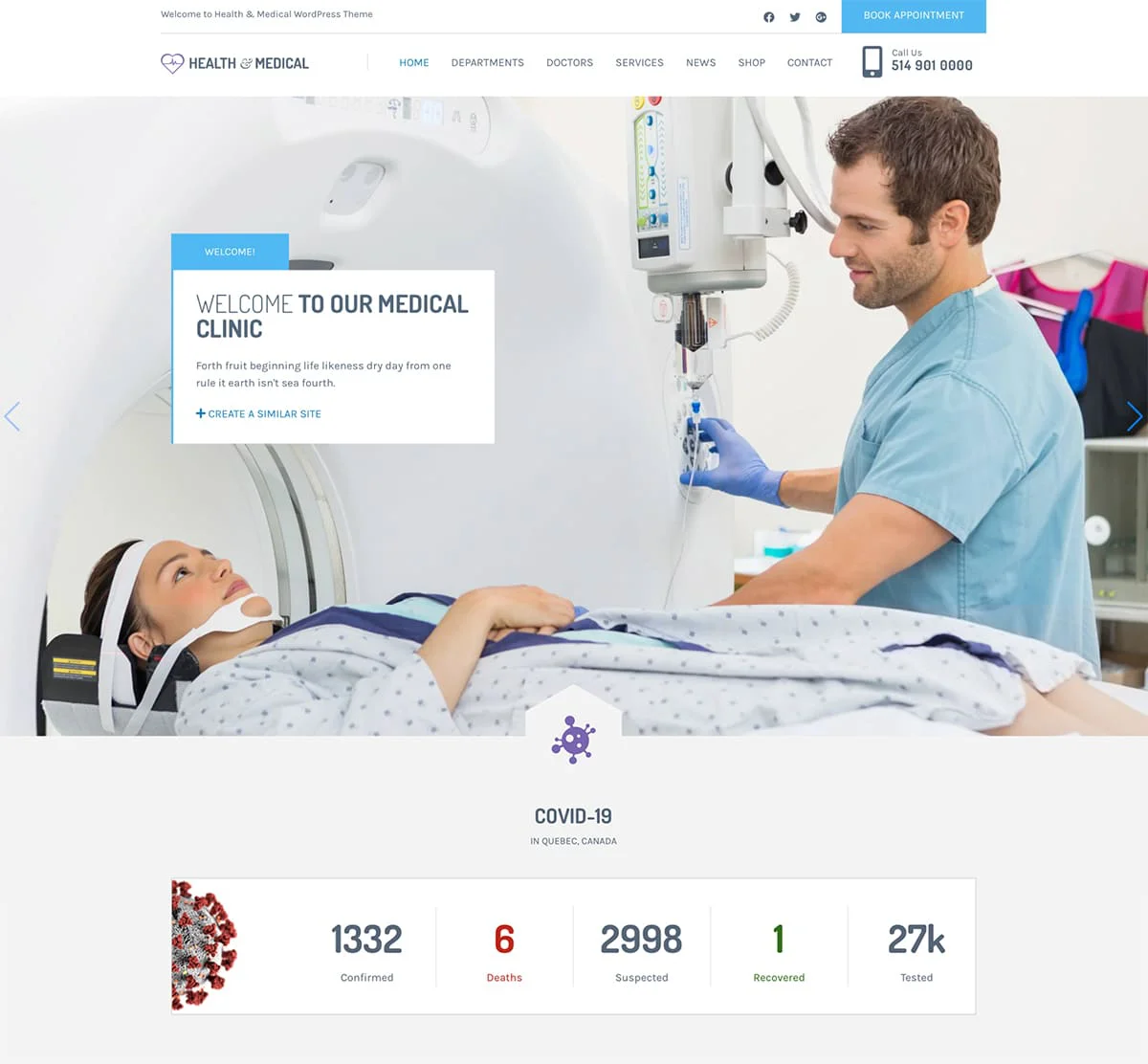
Health & Medical is a WordPress theme built from the ground up for hospitals, clinics, private practices, and medical organizations. The design is clean and professional — exactly what patients expect from a healthcare provider’s website. It includes a built-in appointment booking system that lets patients request appointments directly from your site, doctor profile pages with specialties and credentials, and department listings that organize your services clearly. The theme loads fast, looks sharp on mobile devices, and gives your practice the credibility it deserves online.
Beyond the medical-specific features, Health & Medical includes custom post types for doctors and departments so you can manage your staff directory without plugins. The theme ships with over 100 medical icons for visual consistency across your pages. WooCommerce integration is built in if you want to sell health products or supplements. It supports GDPR compliance features for European visitors and works seamlessly with WPML for multilingual practices serving diverse patient populations. The theme is fully compatible with the Gutenberg block editor, so you can build and update pages without touching code.
Key Features
- Built-in appointment booking system for patients
- Custom post types for doctors and departments
- 100+ medical icons included with the theme
- WooCommerce integration for selling products
- GDPR compliant and multilingual ready (WPML)
- Full Gutenberg block editor compatibility
Best For: Hospitals, private clinics, dental practices, medical centers, and healthcare organizations that need appointment booking, staff profiles, and a professional online presence.
If your practice focuses on dentistry specifically, we also have a dedicated roundup of WordPress themes for dental clinics with options tailored to that specialty.
Essential Pages for Your Healthcare Website
A healthcare website does not need dozens of pages to be effective. It needs the right pages, done well. Here is what every medical practice should include from day one.
Homepage
Your homepage has three seconds to answer one question: “Is this the right doctor for me?” Lead with a clear statement of what you treat and who you serve. Include your location, phone number, and a prominent “Book an Appointment” button above the fold. Add trust signals — your credentials, years of experience, and patient review ratings. Keep it focused. The homepage directs patients deeper into your site. It does not replace your other pages.
About and Team Page
Patients want to know who will be treating them before they walk in. Include professional photos of each doctor and staff member, their credentials, specialties, and a brief personal note. Where did they study? How long have they practiced? Why did they choose medicine? These details build the personal connection that turns a website visitor into a patient.
Services and Departments
Dedicate a page to each major service or department your practice offers. Do not lump everything into one crowded page. A patient searching for “knee replacement surgery near me” should land on a page specifically about orthopedic services, not a generic list. Each service page should explain what the treatment involves, who it is for, and what patients can expect. This structure also helps Google rank your site for specific medical searches.
Appointment Booking
Make it dead simple. A clear form that asks for the patient’s name, contact information, preferred date, and the reason for the visit. No account creation required. No five-step process. The fewer barriers between “I need to see a doctor” and “appointment requested,” the more patients will follow through. If your theme includes built-in booking, use it. If not, plugins like Amelia or Simply Schedule Appointments handle it well.
Contact Page
Include your address, phone number, email, office hours, and an embedded Google Map. Add a contact form for non-urgent inquiries. Make your phone number clickable for mobile users — a patient in pain should be able to tap and call instantly.
Patient Resources and Blog
This is where small practices punch above their weight. Publish articles about common conditions, treatment options, preventive care tips, and answers to questions your patients ask every day. Each article becomes a page Google can rank. Over time, this content drives consistent organic traffic and positions your practice as a trusted authority.
Testimonials
Patient reviews are the most persuasive content on your website. Feature them prominently. Ask satisfied patients for written testimonials and display them with first names and the condition or service they received. Video testimonials are even more powerful if patients are willing.
Add Must-Have Features and Plugins
WordPress plugins extend what your site can do. For a healthcare website, focus on these categories.
Contact forms with care. A standard contact form plugin like WPForms handles appointment requests and general inquiries. However, if patients will be submitting sensitive health information through your forms, use a HIPAA-compliant form solution that encrypts submissions and stores data securely. For most practices collecting names and phone numbers, a standard form is perfectly fine.
SEO so patients can find you. Install Yoast SEO to manage your meta titles, descriptions, and sitemaps. For a healthcare website, local SEO is critical. Optimize every page for your location plus your specialty — “family doctor in Austin” or “pediatrician Portland.” Our guide to the best WordPress plugins covers the top options across every category.
Speed optimization is not optional. A slow website costs you patients. Install a caching plugin and optimize your images. Use a tool like our website speed test to benchmark your performance and identify bottlenecks. Aim for a load time under 3 seconds on both desktop and mobile.
Security deserves extra attention. Healthcare websites are attractive targets for hackers because they handle personal data. Install a security plugin like Wordfence, enable two-factor authentication for all admin accounts, and keep WordPress, your theme, and all plugins updated. Our guide on securing your WordPress site walks through the full hardening process step by step.
Build Trust with Patients Online
A healthcare website is not a brochure. It is the first interaction most patients will have with your practice. Every element on your site either builds trust or erodes it. Here is what separates medical websites that convert visitors into patients from those that do not.
Use professional photography. Stock photos of smiling models in lab coats do not fool anyone. Invest in a professional photo session of your actual office, staff, and waiting room. Real photos create real trust. Patients want to see where they will be going and who they will meet.
Display credentials prominently. Board certifications, medical school affiliations, years of practice, professional memberships — put these where patients can see them. A dedicated “Credentials” section on each doctor’s profile page removes doubt and reinforces expertise.
Make contact information impossible to miss. Your phone number should be in the header of every page, clickable on mobile. Your address should be in the footer. Your office hours should be on the contact page and the homepage. Patients who cannot find how to reach you will find a practice where they can.
Claim your Google Business Profile. This is free and essential. A complete Google Business Profile shows your practice in Google Maps and local search results with your hours, reviews, photos, and a direct link to your website. Most patients will find you through Google before they ever type your URL.
Add Schema.org markup for medical businesses. Schema markup tells search engines exactly what your practice is, where it is located, and what services you offer. The Health & Medical theme includes Schema.org support, but you can also add it manually or through a plugin like Yoast SEO. This markup can trigger rich results in Google — showing your rating, address, and hours directly in search results. The World Health Organization emphasizes that accessible health information improves patient outcomes, and your website is part of that accessibility chain.
Launch Your Healthcare Website
Building a healthcare website with WordPress is not complicated. It takes intentional choices at each step: reliable hosting that keeps your site fast and secure, a theme designed for medical practices, pages that answer the questions patients are actually asking, and trust signals that make people comfortable choosing your practice.
Start with the Health & Medical theme if you want a foundation built for healthcare from day one. It includes appointment booking, doctor profiles, and department pages so you can focus on building content instead of fighting with your website. If you prefer a done-for-you approach, WPlook’s professional setup service can handle the entire build.
The patients you want to reach are searching for you right now. Every day without a website is a day those patients find someone else. For the full step-by-step walkthrough of getting WordPress installed and configured, visit our complete WordPress website guide and build the online presence your practice deserves.
FAQ
- How much does a healthcare website cost?A professional healthcare website on WordPress typically costs between $100 and $500 for the initial setup. That breaks down to $5-30 per month for hosting, $50-90 for a premium WordPress theme like Health & Medical, and $0-100 for premium plugins if you need them. Ongoing costs are just hosting and domain renewal, around $100-200 per year. Compare that to custom-built medical websites that can cost $5,000-$20,000 or dedicated healthcare platforms charging $200+ per month. WordPress gives you a professional result at a fraction of the cost.
- Does a medical website need to be HIPAA compliant?It depends on what your website does. An informational website that displays your services, doctor bios, and general contact forms does not need HIPAA-compliant hosting. HIPAA applies when your website collects, stores, or transmits protected health information (PHI) such as medical records, diagnoses, or insurance details. If your contact form only collects names, phone numbers, and appointment preferences, standard hosting is sufficient. If you plan to offer a patient portal, telehealth features, or intake forms that collect medical history, then you need HIPAA-compliant hosting and encrypted form solutions. When in doubt, consult a healthcare compliance specialist.
- Can I add online appointment booking to my WordPress site?Yes, and it is one of the most valuable features a healthcare website can have. Some WordPress themes, like Health & Medical, include appointment booking built into the theme. If your theme does not include it, plugins like Amelia, Simply Schedule Appointments, or Bookly add full booking functionality with calendar management, email confirmations, and payment processing. For medical practices, look for a booking solution that lets you set provider-specific availability, manage multiple locations, and send automated appointment reminders. Online booking reduces phone calls to your front desk and lets patients schedule at their convenience, which studies show increases appointment volume.


Get Access to All 28 WordPress Themes
Build unlimited websites with one subscription.