
Keyword research forms the foundation of every successful SEO strategy. The right Google keyword tool helps you discover what your audience searches for, analyze competition, and find opportunities to rank higher in search results.
This guide covers the best keyword research tools available, from free options for beginners to professional suites for agencies. Whether you are optimizing a personal blog or managing SEO for multiple clients, you will find tools that match your needs and budget.
What Makes a Good Google Keyword Tool?
Before diving into specific tools, understand what features matter most for effective keyword research:
- Search volume data — Monthly searches for each keyword
- Keyword difficulty — How hard it is to rank for a term
- SERP analysis — Who currently ranks and why
- Related keywords — Long-tail variations and alternatives
- Trend data — Seasonal patterns and rising topics
- Competitor insights — Keywords your rivals rank for
Free Keyword Research Tools
Google Keyword Planner
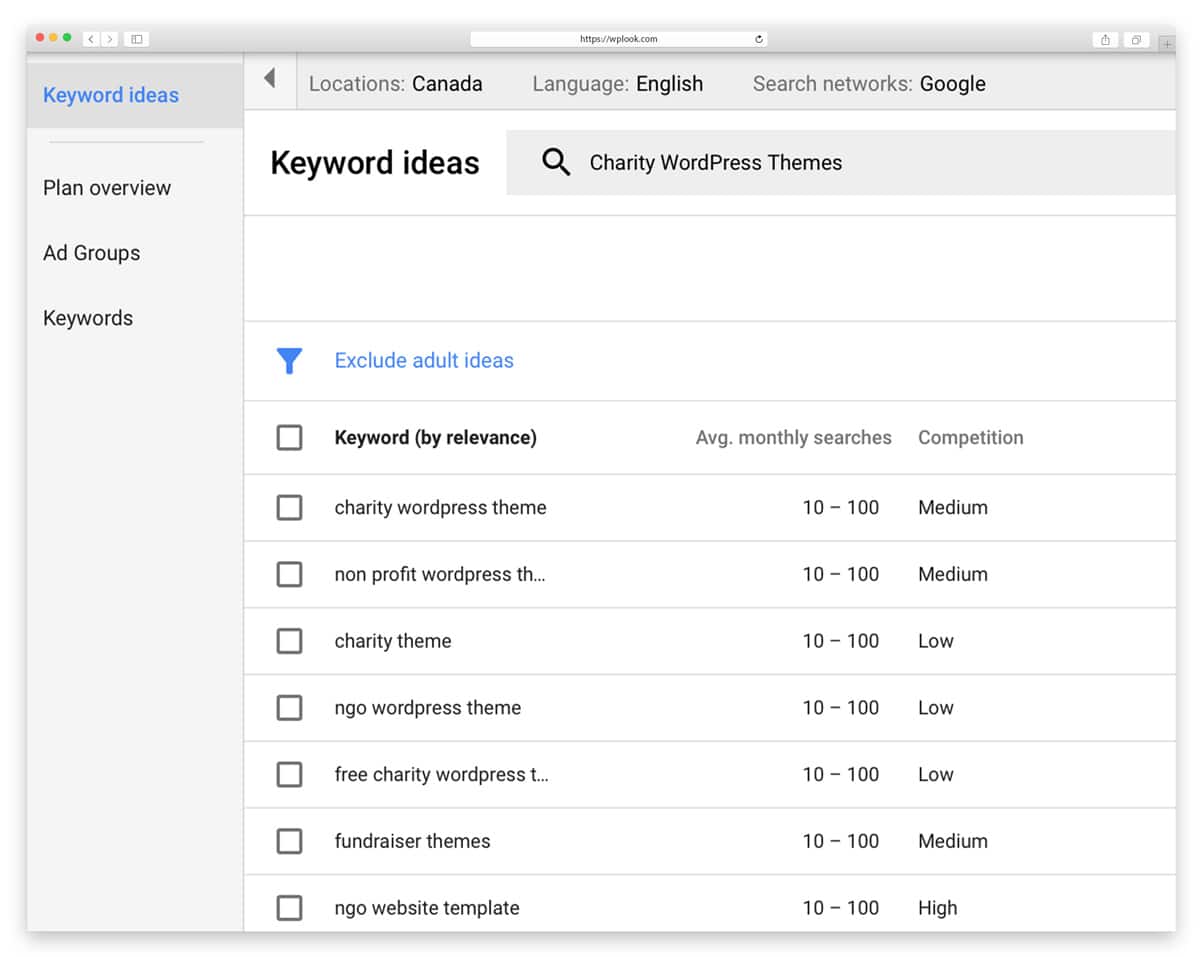
Google Keyword Planner remains essential for anyone serious about keyword research because the data comes directly from Google’s own search engine. As part of Google Ads, it provides search volume ranges, keyword suggestions based on seed terms or URLs, and competition metrics that help you understand the landscape.
The tool shines for validating keyword ideas and understanding seasonal patterns through historical trend data. Location and language filtering let you target specific markets with precision. While it shows volume ranges rather than exact numbers for free accounts, the data is more reliable than third-party estimates.
Key Features
- Search volume data direct from Google
- Keyword suggestions from seeds or URLs
- Competition level for paid advertising
- Cost-per-click estimates for budgeting
- Location and language filtering options
- Historical trend data for seasonality
Best For: Beginners learning keyword research, PPC advertisers, and anyone wanting free access to Google’s own search data.
Google Trends

Google Trends shows relative search interest over time, making it invaluable for identifying trending topics and seasonal patterns that other keyword tools miss. You can compare up to five terms simultaneously to see which topics are gaining or losing momentum in your market.
The geographic breakdown reveals where interest is strongest, helping you target content to specific regions. The Rising filter is particularly powerful for catching emerging trends early, showing keywords with significant recent growth before they become competitive.
Key Features
- Interest over time trend graphs
- Geographic breakdown of search interest
- Related topics and rising queries
- Compare up to 5 terms at once
- Filter by category, time, and search type
- Rising and breakout keyword detection
Best For: Content strategists identifying seasonal opportunities, validating trends, and discovering emerging topics early.
Keyword Surfer
Keyword Surfer displays search volume and related keywords directly in Google search results as a Chrome extension, eliminating the need to switch between tools. Data appears automatically as you search, making keyword research a natural part of your browsing workflow.
The sidebar shows related keywords with volume data, while the search bar displays the volume for your current query. Word count and keyword density metrics for ranking pages help you understand what it takes to compete. Domain traffic estimates give quick competitive context.
Key Features
- Search volume shown in Google search bar
- Related keywords in browser sidebar
- Word count and density for ranking pages
- Domain traffic estimates at a glance
- Zero workflow interruption while browsing
- Completely free Chrome extension
Best For: Anyone who wants quick keyword validation without leaving Google or opening a separate research tool.
Ubersuggest
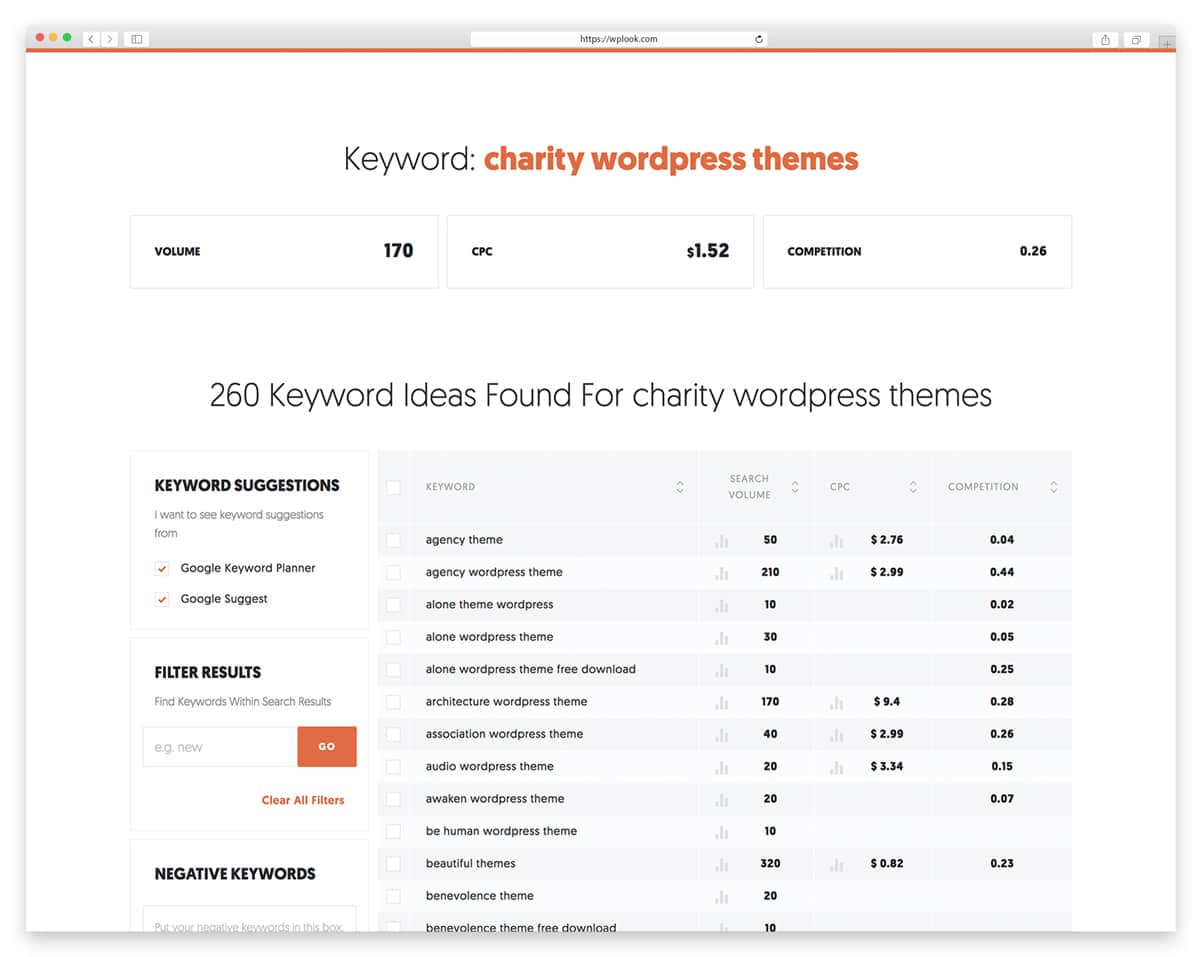
Neil Patel’s Ubersuggest offers a generous free tier that makes professional keyword research accessible to everyone. The tool provides keyword suggestions with volume and difficulty scores, content ideas based on top-performing pages, and domain analysis for understanding your competition.
The free plan includes three daily searches with full data, making it practical for bloggers and small businesses on tight budgets. Backlink data and site audit features round out the toolset, providing a surprisingly complete SEO platform considering the price point.
Key Features
- Keyword suggestions with volume and difficulty
- Content ideas from top-performing pages
- Domain analysis for competitor research
- Backlink data for link building insights
- Site audit for technical SEO issues
- Chrome extension for on-the-go research
Best For: Bloggers, small businesses, and anyone wanting solid keyword data without investing in expensive premium tools.
Premium Keyword Research Tools
Ahrefs Keywords Explorer
Ahrefs offers one of the most comprehensive keyword databases available, covering Google, YouTube, Amazon, Bing, and other search engines. The keyword difficulty scores are based on actual backlink analysis of ranking pages, making them more actionable than estimates from competing tools.
The Traffic Potential metric sets Ahrefs apart by showing estimated organic traffic to the top-ranking page rather than just search volume. This helps you prioritize keywords that actually drive visitors. Click data reveals how many searches result in actual clicks, filtering out keywords where featured snippets or zero-click results dominate.
Key Features
- Keyword difficulty based on backlink data
- Click data showing actual click-through rates
- Parent topic identification for clustering
- SERP overview with detailed competitor data
- Traffic potential beyond just search volume
- Multi-engine support including YouTube
Best For: Professional SEOs, content marketers, and agencies needing the deepest competitive keyword analysis available.
SEMrush Keyword Magic Tool
SEMrush provides an all-in-one SEO platform where the Keyword Magic Tool generates thousands of keyword variations from a single seed term. The tool organizes suggestions into topic groups automatically, making it easy to plan content clusters around related terms.
The Keyword Gap tool is a standout feature that compares your domain against up to five competitors, revealing keywords they rank for that you do not. Position tracking monitors your rankings over time, and content templates analyze top-ranking pages to help you create optimized content from the start.
Key Features
- Thousands of keyword variations generated
- Competitor keyword gap analysis tool
- Domain overview with organic keywords
- Position tracking for rank monitoring
- Content templates from top-ranking pages
- Automatic keyword clustering by topic
Best For: Marketing teams, agencies managing multiple clients, and content strategists who need a complete SEO suite.
Moz Keyword Explorer
Moz pioneered many SEO metrics still used across the industry today, and their Keyword Explorer builds on that foundation with an emphasis on helping you prioritize opportunities. The Priority score combines volume, difficulty, and organic CTR into a single actionable number.
Organic CTR estimates set Moz apart from competitors by showing realistic traffic projections that account for SERP features eating into click-through rates. The SERP analysis includes Page Authority and Domain Authority metrics that Moz is known for, helping you assess whether you can realistically compete for each keyword.
Key Features
- Priority score combining key SEO metrics
- Organic CTR estimates for real projections
- SERP analysis with PA and DA metrics
- Keyword suggestions grouped by similarity
- Save and export keyword lists easily
- Integration with Moz Pro rank tracking
Best For: SEO professionals who value Moz’s authority metrics and need help prioritizing which keywords to target first.
Specialized Keyword Tools
KWFinder by Mangools
KWFinder focuses specifically on finding low-competition keywords, making it the go-to tool for new websites trying to gain traction in search results. The color-coded difficulty scale makes it instantly clear which keywords present realistic ranking opportunities at a glance.
Local keyword research support lets you target specific cities and regions, which is valuable for businesses serving geographic markets. The clean interface avoids overwhelming you with data, presenting exactly what you need to make keyword decisions without the complexity of larger enterprise platforms.
Key Features
- Color-coded keyword difficulty scores
- SERP analysis with competitor metrics
- Search by keyword, domain, or question
- Local keyword research by city or region
- Historical search volume trend data
- Import keywords from other tools
Best For: Niche site builders, affiliate marketers, and new websites focusing on achievable long-tail keywords.
Answer The Public
Answer The Public takes a unique approach to keyword research by organizing suggestions around the questions people actually ask about your topic. The tool maps out who, what, where, when, why, and how variations, revealing the full scope of user curiosity around any subject.
Preposition and comparison keywords add another dimension that traditional tools miss entirely. The visual wheel display shows how topics connect and branch, helping you plan comprehensive content that answers every angle of a question. This makes it invaluable for building FAQ sections and pillar content.
Key Features
- Question-based keyword suggestions mapped
- Preposition keywords (with, for, near)
- Comparison keywords (vs, versus, or)
- Alphabetical keyword variations listed
- Visual wheel showing topic relationships
- CSV export for further analysis
Best For: Content creators planning FAQ sections, blog posts, and comprehensive topic coverage around user questions.
AlsoAsked
AlsoAsked visualizes People Also Ask data from Google, showing how questions branch into related topics across multiple levels. This reveals the full scope of user curiosity around any subject and helps you plan content that covers topics comprehensively.
The branching question maps show content structure opportunities that keyword volume data alone cannot reveal. By understanding how Google connects questions, you can build internal linking strategies and content hierarchies that align with how search engines organize information.
Key Features
- People Also Ask data visualization
- Multi-level question branching maps
- Content structure opportunities revealed
- Export to CSV and PNG formats
- Multiple country and language support
- Bulk search for large-scale research
Best For: Content planners building comprehensive topic coverage and FAQ sections aligned with Google’s question hierarchy.
AI-Powered Keyword Tools
Surfer SEO
Surfer SEO combines keyword research with real-time content optimization, bridging the gap between finding keywords and using them effectively. The keyword clustering feature groups related terms by topic, showing which keywords can be targeted together on a single page.
The Content Editor is the standout feature, scoring your content in real-time against the top-ranking pages for your target keyword. NLP-based suggestions help you cover topics comprehensively while the search intent identification ensures you are creating the right type of content for each query.
Key Features
- Keyword clusters grouped by topic intent
- Real-time Content Editor optimization
- SERP Analyzer for competitor content
- Search intent identification built in
- NLP-based keyword and topic suggestions
- Content briefs generated for writers
Best For: Content teams and SEO agencies that want to optimize content as they create it with real-time scoring.
Clearscope
Clearscope uses AI to analyze top-ranking content and generate keyword recommendations for optimizing your pages. The content grading system scores your writing from A++ to F, showing exactly which terms to add for better rankings and more comprehensive coverage.
Google Docs and WordPress integrations let you optimize content within your existing workflow without switching tools. Competitor content analysis reveals which keywords and topics top-ranking pages cover that yours may be missing, helping you close content gaps systematically.
Key Features
- AI-powered content grading (A++ to F)
- Keyword recommendations from top pages
- Real-time content optimization scoring
- Google Docs and WordPress integration
- Competitor content gap analysis
- Readability and comprehensiveness scoring
Best For: Content teams focused on building topical authority and ensuring comprehensive coverage of every subject.
Frase
Frase combines keyword research with AI content generation, analyzing search results to create detailed content briefs in minutes. The tool examines what top-ranking pages cover and builds outlines that ensure your content addresses every relevant subtopic and question.
The AI writing assistant helps you draft optimized content based on the brief, while the optimization scoring tells you how well your draft compares to competitors. People Also Ask integration surfaces questions your audience is asking, making it easy to add relevant FAQ sections.
Key Features
- Automated content briefs from SERP data
- AI writing assistant for content drafts
- People Also Ask question research
- Content optimization scoring system
- Outline builder from competitor analysis
- SERP data with keyword metrics
Best For: Content writers who want research, briefing, and writing assistance combined in a single affordable tool.
KeywordInsights.ai
KeywordInsights.ai uses AI to cluster thousands of keywords by search intent and topic, revealing which terms can be targeted together on single pages. Upload a large keyword list and the tool groups them automatically based on SERP similarity analysis.
Search intent classification tells you whether each cluster is informational, transactional, or navigational, helping you create the right type of content. Content gap identification shows where your site is missing coverage compared to competitors, making it a powerful planning tool for large content campaigns.
Key Features
- AI keyword clustering by search intent
- Content brief generation from clusters
- Search intent classification automated
- SERP similarity analysis for grouping
- Bulk keyword processing at scale
- Content gap identification vs competitors
Best For: SEO strategists planning large content campaigns and building comprehensive site structures from keyword data.
ChatGPT and Claude for Keywords
AI assistants like ChatGPT and Claude excel at brainstorming keyword ideas, understanding search intent, and generating topic variations that data-driven tools might miss. While they do not provide search volume numbers, they uncover creative angles and long-tail variations by understanding the psychology behind searches.
The real power is combining AI brainstorming with traditional data tools. Use ChatGPT or Claude to generate comprehensive seed keyword lists and explore user pain points, then validate the best ideas with Ahrefs, SEMrush, or Google Keyword Planner for volume and difficulty data.
Key Features
- Creative seed keyword brainstorming
- Search intent and pain point analysis
- Long-tail keyword idea generation
- Related topic and subtopic discovery
- Content outline creation from keywords
- Audience psychology-based suggestions
Best For: Initial brainstorming, understanding user intent, and expanding keyword lists before validating with data tools.
How to Choose the Right Google Keyword Tool
Budget: Start with free tools like Google Keyword Planner, Google Trends, and Ubersuggest’s free tier. Upgrade when you need more data or features.
Experience level: Beginners benefit from simpler interfaces like KWFinder or Ubersuggest. Advanced users often prefer Ahrefs or SEMrush for deeper analysis.
Use case: Content creators might prioritize Answer The Public for topic ideas. Technical SEOs often need Ahrefs or SEMrush for competitive analysis.
AI-assisted workflow: Combine AI tools like Claude for brainstorming with data tools like Ahrefs or SEMrush for validation. Use Clearscope or Frase to optimize content after keyword selection.
Building a successful WordPress website starts with understanding what your audience searches for. These tools help you make informed decisions about content strategy.
Frequently Asked Questions
- What is the best free Google keyword tool?Google Keyword Planner offers the most reliable free data since it comes directly from Google. For additional features without cost, combine it with Google Trends and the free tiers of Ubersuggest or Moz Keyword Explorer.
- How many keywords should I target per page?Focus on one primary keyword and 2-4 closely related secondary keywords per page. Trying to rank for too many unrelated terms dilutes your content’s relevance and hurts rankings.
- What is keyword difficulty and how is it calculated?Keyword difficulty estimates how hard it is to rank for a term, typically on a 0-100 scale. Tools calculate it differently, but most analyze the backlink profiles and authority of currently ranking pages. Higher scores mean tougher competition.
- Should I target high-volume or low-competition keywords?Balance both. High-volume keywords attract more traffic but face stiff competition. Low-competition keywords are easier to rank for but bring less traffic. The sweet spot is finding medium-volume keywords with manageable competition that match your site’s authority.
Related guides: Once you have identified your keywords, you will need the right tools to create content. Check our guides on code editors for developers, photo editors for visual content, and tips on speeding up your WordPress site for better SEO performance.
Google Keywords

Get Access to All 28 WordPress Themes
Build unlimited websites with one subscription.