

Add Pledge
You can add new pledges through Pledges → Add Pledge in the WordPress Administration Panel.
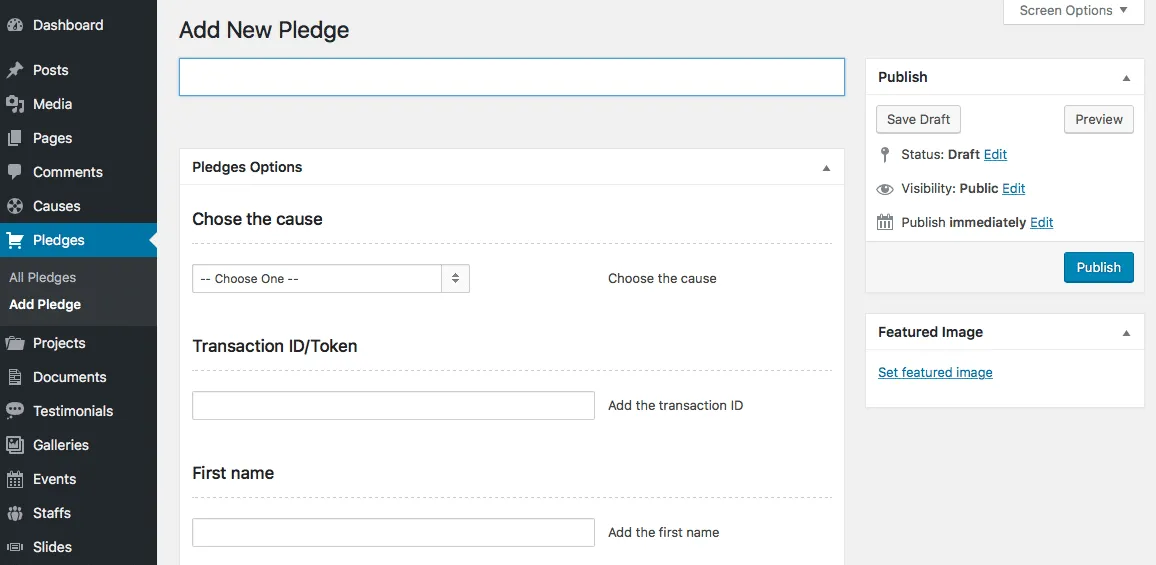
Add New Pledge Screen
Unlike other post types, pledges do not contain most of the same options as standard posts. They support only a few specific fields.
Pledge Options
Section titled “Pledge Options”Pledge Options are found below the title on the Edit Pledge page. If the Pledge Options are not visible, make sure they are checked inside the Screen Options area at the top.
If you are adding a new pledge, make sure you have saved the post before editing pledge options. Otherwise, the pledge options will not be visible.
Choose the cause
Section titled “Choose the cause”Select the cause this pledge will be attributed to from the causes dropdown. The total of pledges to this cause will be displayed alongside the cause.
Transaction ID/Token
Section titled “Transaction ID/Token”This is the pledge transaction ID. Use a PayPal reference as the transaction ID if the pledge is made using PayPal, or anything else otherwise.
First name
Section titled “First name”The first name of the person making the pledge.
Last name
Section titled “Last name”The last name of the person making the pledge.
Country
Section titled “Country”The address of the person making the pledge.
The email address of the person making the pledge.
Donation Amount
Section titled “Donation Amount”The amount the person has pledged, in the currency selected in Appearance → Theme Options → Payment settings → Currency Code. Do not enter a currency code in this field, just a number.
Payment Source
Section titled “Payment Source”The source of the donation – either PayPal, cash/check or manual.
Payment Status
Section titled “Payment Status”Whether the payment has been successfully completed and the money has been collected by your organization. Can be set to either Completed, Refunded or Canceled.