Morning Time Lite
- Clean Code
- Easy to install
- Optimized for speed
- Compatible with PHP up to 8.5
- Responsive Design
- Based on Foundation Zurb
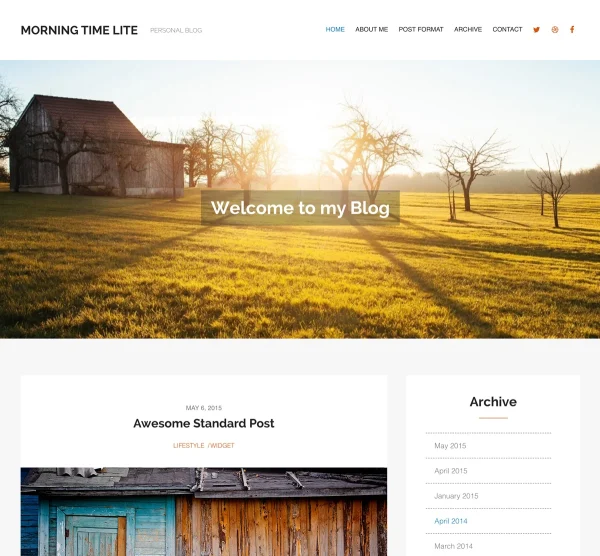
A Free Personal Blog WordPress Theme to Share Your Stories
Morning Time Lite is a free personal blog WordPress theme by WPlook for writers, storytellers and everyday bloggers. When you just want to start writing, you shouldn’t have to spend a weekend on setup or money on a theme. It’s listed on WordPress.org, where it has been downloaded more than 40,000 times, and it includes an archive page, post formats, unlimited colors and WordPress Customizer settings. The premium version, Morning Time PRO, costs $99 a year and adds a portfolio, WooCommerce support and professional support. Current version: 1.3.3, compatible with WordPress 7.1, last updated February 2026.
Maybe you’re starting a personal journal, a creative writing blog or a daily diary. Morning Time Lite gives your readers a clean page with nothing pulling attention away from your words. It’s compatible with WordPress 7.1 and the Gutenberg block editor, and it’s an easy place to start if you want to blog without a lot of setup.
Smart Features
What’s included in Morning Time Lite, for free:
Lightning-Fast Performance
Lightweight code delivers fast page loads that keep readers focused on your writing.
Fully Responsive Design
Your blog adapts to desktops, tablets and phones, so readers can follow along wherever they are.
Beautiful Archive Page
A dedicated archive organizes your posts by date so readers can discover and browse your writing history.
WordPress Customizer
Configure colors, layout and settings with live preview, in a few clicks.
Unlimited Color Schemes
Match your blog to your personal style with unlimited color options. No coding required.
Multilingual Ready
Blog in any language. Compatible with WPML and translation plugins for global audiences.
GDPR Compliant
Built with privacy in mind, following GDPR guidelines for responsible data handling.
Clean Code
Built following WordPress coding standards. Compatible with WordPress 7.1 for reliability.
Gutenberg Compatible
Works with the block editor, so you build posts with drag-and-drop.
Custom Logo Upload
Upload your own logo to personalize your blog and create a recognizable brand identity.
WPlook Blog and Magazine WordPress Themes Compared
| Theme | Best for | Standout features | Price |
|---|---|---|---|
| Magazine PRO | Online magazines, travel and photography publications | Magazine layout, 9 widget areas, archive page | $99/year |
| Magazine Lite | Starting a magazine for free | Magazine layout, 7 widget areas, unlimited colors | Free |
| Makenzie PRO | Lifestyle bloggers who also sell products | Promo boxes, link-in-bio page, WooCommerce shop | $99/year |
| Makenzie Lite | Lifestyle blogs with no budget | Promo boxes, 5 custom widgets | Free |
| My Journey | Fashion and style bloggers | Minimal photo-first layout, social sharing | $99/year |
| Morning Time PRO | Writers and personal bloggers | 7 post formats, portfolio, WooCommerce | $99/year |
| Morning Time Lite | Personal blogs with no budget | Archive page, post formats | Free |
| Family Blog | Parents sharing family life | 7 post formats, portfolio, WooCommerce | $99/year |
Comparing free options? See our list of the best free personal blog WordPress themes, or follow our guide to starting a blog.
Starting Your First Blog with Morning Time Lite
If this is your first blog, here is a simple path from a blank WordPress site to your first published post. You can do all of it in an afternoon.
1. Install the theme. In your WordPress dashboard, go to Appearance → Themes → Add New, search for “MorningTime Lite”, then click Install and Activate.
2. Set your colors. Open Appearance → Customize, pick colors that suit you and upload your logo if you have one. The live preview shows each change before you save, so try a few combinations.
3. Write your first post. Go to Posts → Add New and start typing in the block editor. Keep it simple: who you are, what you plan to write about and how often. A short, honest first post beats a polished one you never publish.
4. Choose a post format. Not every post is an essay. If a post is a quick note or a single photo, look at the post format options in the editor sidebar and pick the one that fits.
5. Use the archive page. Once you have a few posts up, create a page, choose the Archive template in the page settings, and add it to your menu so new readers can browse everything you’ve written by date.
That is all the setup you need. Post on a schedule you can keep, and when you want a portfolio or a shop, you can move to Morning Time PRO and keep your content.
Who Is Morning Time Lite For?
Morning Time Lite is for anyone who wants to start a personal blog without spending money. Writers use it to publish essays and creative writing. New bloggers test the waters before investing in a premium theme. Journal keepers document daily life with a clean, distraction-free design. And when you outgrow the free version, you can upgrade to Morning Time PRO for WooCommerce, post formats, portfolio and more, without rebuilding your site.
Frequently Asked Questions
- Is Morning Time Lite really free?Yes. Morning Time Lite is completely free with no hidden costs. Download it and start blogging on any WordPress website. Upgrade to Morning Time PRO when you need more features.
- Can I upgrade to Morning Time PRO later?Yes. Morning Time PRO adds WooCommerce, 7 post formats, portfolio, advanced theme options, and professional support. You can upgrade without losing existing content.
- Where can I download Morning Time Lite?From WordPress.org or directly from your WordPress dashboard under Appearance → Themes → Add New. Search for “MorningTime Lite”.
- Is Morning Time Lite good for a first blog?Yes. It has a simple, clean layout and no setup beyond activating the theme and writing your first post. When you want a portfolio or a shop, you can move to Morning Time PRO and keep all your content.
1 review for Morning Time Lite
Compare Packages
- Theme & Hosting
- MorningTime Pro Theme
- Starter WordPress Hosting
- Web Space: 10GB NVMe
- 5 Email Accounts
- Backups Every 6 Hours
- Free SSL Certificate
- LiteSpeed Caching
- $15 /m
- Order Now
- Free Download
- WordPress Theme
- Child Theme
- Support
- Theme Documentation
- Dummy Content
- $0
- Download
- Single Theme
- Single Theme
- Child Themes
- Support & Updates
- Theme Documentation
- Dummy Content
- Auto-renews yearly
- Cancel Anytime
-
$
129$99 /y - Save 23%
- Order Now
- All Theme Pack
- Access to All Themes
- Child Themes
- Support & Updates
- Theme Documentation
- Dummy Content
- Auto-renews yearly
- Cancel Anytime
- Read More
-
$
297$199 /y - Save 33%
- Order Now
Get Access to All 29 WordPress Themes
Build unlimited websites with one subscription.
The Barefoot Bookworm –
What a Joy!
This theme is a joy to use and customize. I was able to get a project done in a matter of hours though it had been stalled for days. Thank you for your generosity!
(source: wordpress.org)