

Add New Slide
You can add new slides through Slider → Add New Slide in the WordPress Administration Panel.
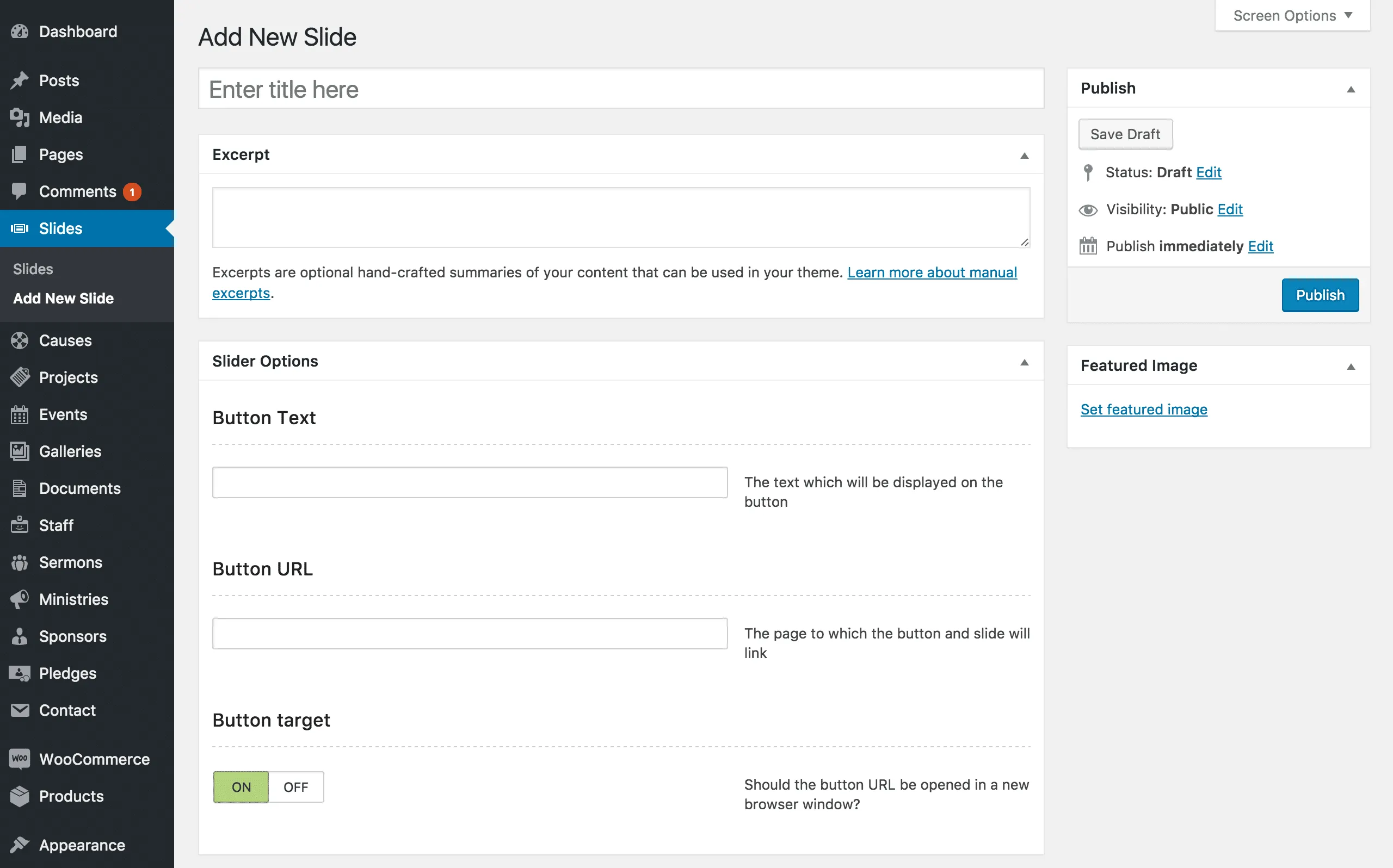
The Slider → Add New Slide screen
Slides are limited to only a certain subset of the options of standard posts, because they don’t contain any real content.
Slide Title
Section titled “Slide Title”The slide title is used as the main text on the slide. Keep it short, not using more than a short sentence.
Excerpt
Section titled “Excerpt”The excerpt is used as the slide subtitle. Keep it short, not using more than a sentence or two.
Featured Image
Section titled “Featured Image”The featured image is used as the background for the slide. Select a wide but short image, around 1680px x 275px. Click the + button to upload an image.
Slide Options
Section titled “Slide Options”Slide Options are found below the excerpt on the Edit Slide page. If the Slide Options are not visible, make sure they are checked inside the Screen Options area at the top.
Button text
Section titled “Button text”This is the content of the button used to link to another post or external page. Keep this field empty if you don’t want to display a button.
Button URL
Section titled “Button URL”This is the URL linking to another post or external page. Keep this field empty if you don’t want to display a button.
Button target
Section titled “Button target”Set this to On to open the URL in a new tab. Otherwise, set it to Off to open the URL in the current tab your site is open in.