



Looking for the best WordPress hosting provider? We compared 7 top hosts based on speed, support, features, and price. Find the right one for your website needs.
WordPress hosting matters more than many realize. Your host affects site speed, security, and uptime. A great host makes WordPress shine. A poor one causes headaches and lost visitors. We have been building and hosting WordPress sites for over a decade, and the hosting provider you choose has a direct impact on everything from how easy it is to build your site to how well it ranks in search engines.
The rising popularity of WordPress has increased hosting options. Competition brings better services and prices. But not all hosts deliver on promises. We tested these WordPress hosting providers with real sites to help you make the right choice.
What to Consider Before Choosing a WordPress Host
Before comparing providers, understand what matters most for a WordPress hosting provider:
- Management options – Managed vs self-managed hosting
- Price – Initial and renewal costs
- Security – SSL, malware protection, backups
- Uptime – Server reliability guarantees
- Control – Access to server settings
- Storage – Available disk space
- Speed – Server response times
- Support – Help availability and quality
Different hosting types exist: shared, VPS, cloud, dedicated, and managed. Match the type to your needs and budget. For most WordPress sites, managed or optimized shared hosting strikes the best balance between cost and performance.
WPlook Hosting (Editor’s Choice)

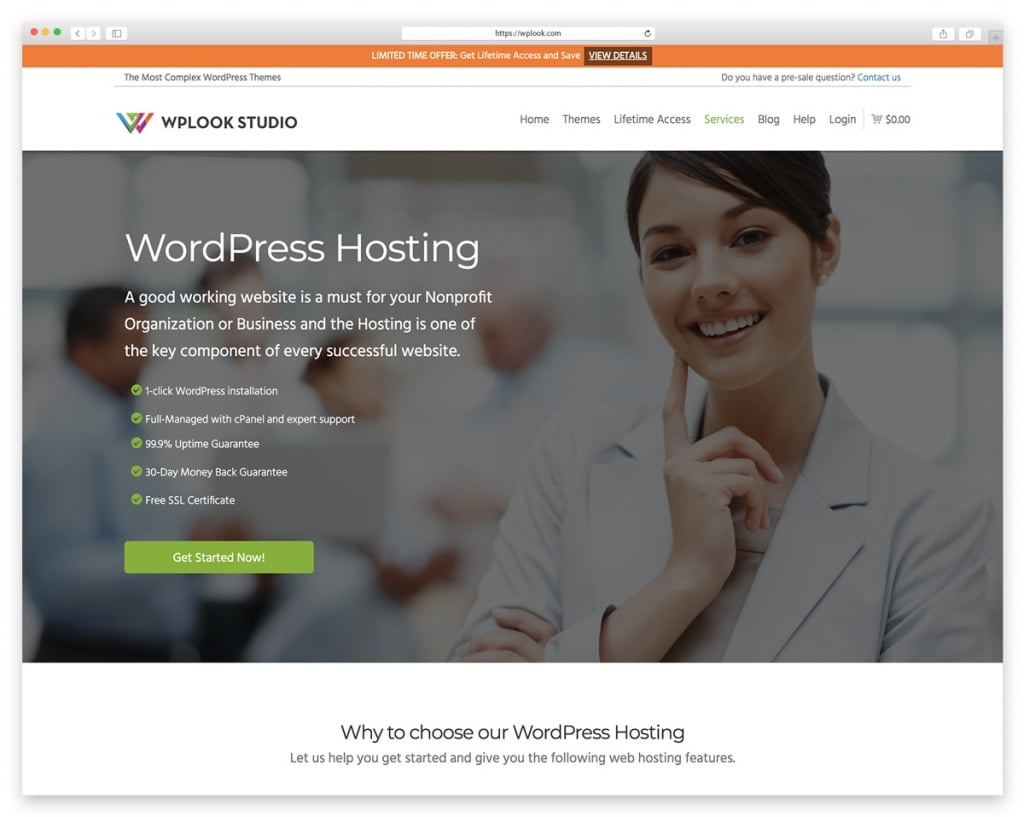
WPlook Hosting is designed specifically for WordPress. The team understands WordPress deeply and optimizes every aspect of the server environment for it. Unlike generic hosts that support dozens of platforms, WPlook focuses exclusively on WordPress performance and reliability.
Support is where WPlook truly stands apart. Because the team builds WordPress themes and plugins themselves, they understand WordPress issues at a deeper level than typical hosting support. Response times are fast, and solutions are practical rather than scripted.
Key Features
- WordPress-optimized servers with fine-tuned PHP and MySQL configuration
- Free SSL certificates on all plans
- Daily automatic backups with easy restore
- One-click WordPress installation
- Expert WordPress support from theme developers
- 128MB upload limit by default
- 30-day money-back guarantee
Best For: Anyone who wants WordPress-specific hosting with knowledgeable support at a fair price.
WP Engine
WP Engine is a premium managed WordPress host that handles updates, security, and performance optimization so you can focus on content. They pioneered the managed WordPress hosting category and remain one of the most recognized names in the space.
The platform includes staging environments for testing changes before going live, which is invaluable for business sites. Their EverCache technology and global CDN deliver consistently fast page loads. The main drawback is the price — starting at $25/month, it is significantly more expensive than shared hosting alternatives.
Key Features
- Fully managed WordPress with automatic updates
- Built-in CDN and EverCache technology
- One-click staging environments
- Genesis themes and StudioPress included
- Automated daily backups
- Premium 24/7 support
Best For: Business sites, agencies, and anyone who wants a fully hands-off managed WordPress experience and can justify the premium price.
SiteGround
SiteGround offers quality WordPress hosting at competitive prices. They are known for excellent support and strong uptime. Their custom Site Tools dashboard is intuitive and well-designed, making server management straightforward even for non-technical users.
SiteGround’s SuperCacher technology significantly improves WordPress page load times on their higher-tier plans. They also offer multiple data center locations across three continents, letting you host closer to your audience. The main concern is renewal pricing — introductory rates are attractive, but renewals jump significantly.
Key Features
- Free site migration for WordPress
- Daily automatic backups
- Free SSL on all plans
- SuperCacher for improved speed
- 24/7 expert support with fast response times
- Multiple data centers (US, Europe, Asia)
Best For: WordPress users who want reliable hosting with great support at a reasonable entry price, and don’t mind higher renewal costs.
Bluehost
Bluehost is officially recommended by WordPress.org and hosts millions of WordPress sites. Their onboarding experience is one of the most beginner-friendly in the industry, walking new users through WordPress setup step by step.
While Bluehost is a solid choice for beginners, more experienced users may find the performance and support quality inconsistent compared to premium alternatives. The aggressive upselling during checkout is also a drawback. That said, for someone launching their first WordPress site on a budget, Bluehost remains a reasonable starting point.
Key Features
- Free domain name for the first year
- Free SSL certificate included
- One-click WordPress installation
- 24/7 phone and chat support
- 30-day money-back guarantee
- WordPress.org officially recommended
Best For: Complete beginners launching their first WordPress site who want the cheapest entry point with a trusted name.
Cloudways
Cloudways offers managed cloud hosting by partnering with major infrastructure providers like DigitalOcean, AWS, and Google Cloud. This approach gives you cloud-level performance with a managed interface that simplifies server administration.
The pay-as-you-go pricing model is refreshing — no long-term contracts or surprise renewal hikes. Their built-in Breeze caching plugin and Cloudflare CDN integration deliver strong performance out of the box. The platform suits developers and technical users who appreciate the flexibility of choosing their cloud provider while avoiding raw server management.
Key Features
- Choice of 5 cloud providers (DigitalOcean, AWS, Google Cloud, Vultr, Linode)
- Pay-as-you-go pricing with no lock-in contracts
- Free SSL certificates and site migration
- Built-in Breeze caching and Cloudflare CDN
- Staging environments on all plans
- Server cloning and vertical scaling
Best For: Developers and technical users who want cloud hosting flexibility with a managed layer, without the complexity of raw server administration.
DreamHost
DreamHost has been in the hosting business since 1997, making them one of the most established providers. They have a strong privacy stance and were one of the first hosts to offer free WHOIS privacy protection on all domains.
Their 97-day money-back guarantee is the longest in the industry, giving you over three months to evaluate the service. DreamHost uses a custom control panel instead of cPanel, which some users love and others find unfamiliar. Performance is reliable though not the fastest, and their WordPress-specific features have improved significantly over the years.
Key Features
- Free domain name included with hosting
- Free WHOIS privacy protection
- Unlimited bandwidth on all plans
- Industry-leading 97-day money-back guarantee
- WordPress pre-installed on new accounts
- Custom control panel with automated updates
Best For: Privacy-conscious users and those who want a long trial period to evaluate their hosting before committing.
Kinsta
Kinsta offers premium managed WordPress hosting built entirely on Google Cloud Platform’s C2 machines. Their infrastructure is designed for speed, using Cloudflare’s enterprise-tier integration for CDN, DDoS protection, and edge caching across 260+ locations worldwide.
The MyKinsta dashboard is one of the best in the industry — clean, fast, and packed with useful tools including APM monitoring, site analytics, and easy PHP version switching. Their DevKinsta local development tool is a nice bonus for developers. The price is premium starting at $35/month, but the performance and tooling justify it for serious WordPress sites.
Key Features
- Google Cloud Platform C2 infrastructure
- Cloudflare Enterprise integration with edge caching
- Free unlimited migrations handled by experts
- MyKinsta dashboard with APM and analytics
- DevKinsta free local development tool
- Automatic daily backups with manual backup options
Best For: Business sites, high-traffic blogs, and agencies that need top-tier performance and are willing to pay for Google Cloud infrastructure.
Comparison Summary
Best overall value: WPlook Hosting — WordPress expertise at reasonable prices with support from actual theme developers.
Best managed hosting: WP Engine — Premium features, staging environments, and hands-off management.
Best for beginners: Bluehost — Easy setup with WordPress.org endorsement and low entry price.
Best for developers: Cloudways — Cloud flexibility with managed simplicity and pay-as-you-go pricing.
Best performance: Kinsta — Google Cloud power optimized specifically for WordPress.
Frequently Asked Questions
- Is shared hosting enough for WordPress?For small sites and blogs with modest traffic, shared hosting works fine. When your site starts receiving more than a few hundred visitors per day, or you notice slowdowns during traffic spikes, it is time to upgrade to VPS, cloud, or managed hosting for better performance and reliability.
- What is managed WordPress hosting?Managed WordPress hosting means the provider handles WordPress updates, security patches, backups, and server optimization for you. You pay more compared to basic shared hosting, but spend less time on maintenance and get better performance. Providers like WP Engine, Kinsta, and WPlook Hosting offer managed WordPress services.
- Can I switch WordPress hosts later?Yes, WordPress sites can migrate between hosts. Many hosting providers offer free migration services to make the switch easier. Start where your budget allows and upgrade as your site grows. The process typically involves moving your files and database, then updating your domain DNS settings.
- How much should I spend on WordPress hosting?For a personal blog or small business site, expect to spend between $3 and $15 per month on quality WordPress hosting. Business-critical sites and high-traffic blogs benefit from managed hosting at $25 to $50 per month. Avoid the cheapest options as they often compromise on speed and support quality.
Conclusion
The best WordPress hosting provider depends on your needs and budget. For most users, WPlook Hosting offers the best balance of WordPress expertise, performance, and price. Their team builds WordPress themes and plugins, so they understand the platform at a level most hosts simply cannot match.
Start with quality hosting from day one. It affects everything else about your WordPress experience — from how fast your pages load to how secure your site stays. Learn more about building your site in our guide on how to make a website with WordPress.