

Customizer
The theme uses the WordPress Customizer feature for it’s global/theme options. Customizer is a native WordPress feature which was added to WordPress back in 2012, so if you’ve ever used WordPress you won’t have any problems.
You can access the customizer at WP Admin → Appearance → Customize.
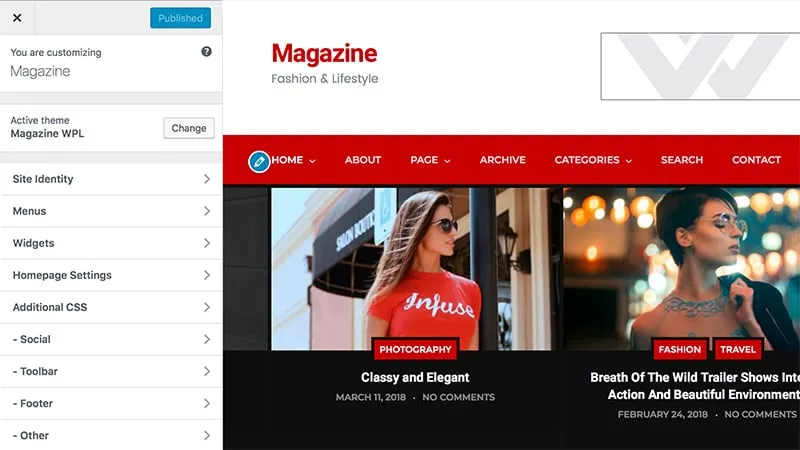
Site Identity
Section titled “Site Identity”To change the text on the logo or set an image logo go to the Identity section of Customizer. If setting an image logo make sure to uncheck the checkbox “Display Site Title and Tagline”.
- Site Title: This is the website name, it will appear if a logo is not available.
You can add a logo instead of the Site Title in Appearance → Theme Options. - Tagline: This is a short description of your site, which will appear under the logo or site title.
Use this section to manage navigation menus, such as the main theme navigation in the header. For more information regarding theme menus, please read the Menu chapter.
Widgets
Section titled “Widgets”Use this section to manage all widgets areas and to add, remove or edit widgets. For more info regarding the widgets please read the Widgets chapter.
Social
Section titled “Social”In the social URLs section of the theme options, you can set the URLs to your social website profiles. They will be used for the social elements/icons in the social widget.
Toolbar
Section titled “Toolbar”In the toolbar section, you can change/add Search and Social Media.
Footer
Section titled “Footer”In the footer section of the theme options, you can change the copyright text.
In the other section of the theme options are miscellaneous options such as changing the layout on search and archive pages.