


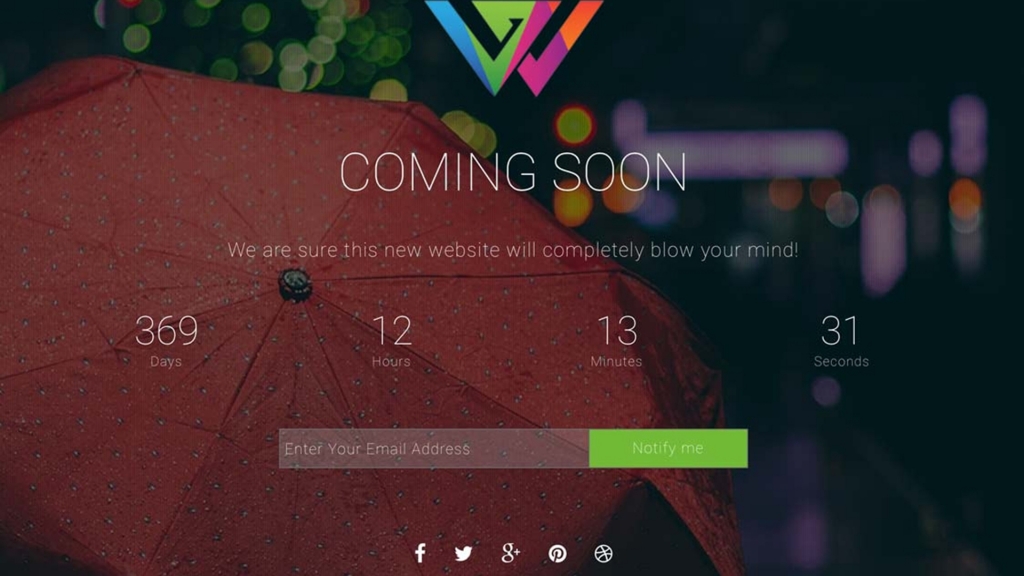
Every WordPress site needs maintenance mode at some point. Whether launching a new site, making major updates, or redesigning your pages, visitors shouldn’t see work in progress. ComingSoon creates professional placeholder pages that keep visitors informed while you work behind the scenes.
Unlike generic “under construction” notices, ComingSoon delivers polished landing pages that build anticipation and collect leads. Your maintenance page becomes a marketing opportunity instead of a dead end. This guide is part of our complete WordPress plugins guide.
What Is ComingSoon?
ComingSoon is a WordPress maintenance mode plugin developed by WPlook Studio. It hides your site behind a customizable landing page while you make changes. Logged-in administrators see the full site while visitors see your coming soon page.
The plugin works for site launches, redesigns, scheduled maintenance, and temporary closures. One-click activation lets you enable maintenance mode instantly when issues arise. Scheduled mode automates maintenance windows.
Key Features
ComingSoon includes everything you need for effective maintenance pages without bloat or complexity.
Countdown Timer
Build anticipation with countdown timers showing when your site goes live. Visitors see exactly how long until launch. The timer motivates them to return on launch day. Customize countdown display and set your target date through the dashboard.
Newsletter Integration
Capture visitor emails while your site is down. Newsletter signup forms let interested visitors subscribe for launch notifications. Connect with major email marketing platforms. Turn maintenance downtime into list-building time.
Multiple Color Schemes
Match your brand with customizable color options. Choose colors that align with your eventual site design. Multiple preset schemes get you started quickly. Full color control lets you fine-tune every element.
Social Network Links
Keep visitors connected through social media while your main site is down. Add links to Facebook, Twitter, Instagram, and other platforms. Social icons display prominently on your maintenance page. Visitors can follow your updates until launch.
Video and Image Backgrounds
Create stunning visual impact with custom backgrounds. Upload your own images or videos. Full-screen backgrounds make maintenance pages memorable. Visitors remember professional presentations when sites finally launch.
Why Use a Maintenance Mode Plugin?
Working on a live site creates problems. Visitors see broken layouts, missing images, and half-finished content. Search engines index incomplete pages. Maintenance mode prevents these issues while you work safely.
- Professional appearance – Visitors see polished pages, not broken code
- SEO protection – Search engines don’t index incomplete content
- Lead capture – Collect emails during downtime
- Brand consistency – Maintain your professional image
- Stress-free work – Make changes without visitor pressure
When to Use ComingSoon
Maintenance mode suits various situations beyond simple site launches.
New Site Launches
Build your entire site while displaying a coming soon page. Collect subscriber emails before launch. Create anticipation with countdown timers. Launch to an audience already waiting for your content.
Major Redesigns
Rebuild your site structure without exposing changes. Test new themes and layouts safely. Switch designs at the perfect moment. Visitors see only your polished final result.
Plugin and Theme Updates
Major updates sometimes cause temporary issues. Enable maintenance mode before updating, then disable after testing. Visitors never see error messages or broken functionality.
Seasonal Closures
Some businesses close seasonally. Display a professional notice with reopening dates. Keep visitors informed about your schedule. Collect emails for reopening announcements.
Emergency Situations
When problems occur, enable maintenance mode immediately. Fix issues without visitors watching. One-click activation responds to emergencies quickly. Restore service when ready.
Getting Started with ComingSoon
Setting up ComingSoon takes minutes. Install the plugin from your WordPress dashboard. Configure your settings including background, countdown date, and social links. Enable maintenance mode when ready. Your site stays accessible to logged-in admins while visitors see your coming soon page.
Test your maintenance page by opening an incognito browser window. Verify all elements display correctly. Check mobile responsiveness. Make adjustments as needed before going live with maintenance mode.
Frequently Asked Questions
- Can I still access my WordPress dashboard during maintenance mode?Yes. Logged-in administrators access the full site and dashboard normally. Only logged-out visitors see the maintenance page. You can work on your site without restrictions while maintenance mode runs.
- Does maintenance mode affect SEO?ComingSoon uses proper HTTP status codes that tell search engines your site is temporarily unavailable. Short maintenance periods don’t harm rankings. Avoid keeping sites in maintenance mode for extended periods. For new site launches, maintenance mode prevents search engines from indexing incomplete content.
- Can I give specific users access during maintenance?Yes. ComingSoon lets you whitelist specific user roles or IP addresses. Clients can preview sites during development. Team members access the site for testing. Configure access rules in the plugin settings.
- Will email signups work with my email marketing service?ComingSoon integrates with major email platforms including Mailchimp, Constant Contact, and others. Configure your email service connection in the plugin settings. Test signup forms before relying on them for lead capture.
- Can I schedule maintenance mode to activate automatically?Yes. Schedule maintenance windows in advance. Set start and end times for automatic activation and deactivation. Perfect for planned updates during low-traffic hours. The plugin handles timing automatically.
- Does the plugin work with WooCommerce?Yes. ComingSoon works with WooCommerce stores. Put your store in maintenance mode during inventory updates or major changes. Keep checkout pages working while other pages show maintenance notices, or enable full maintenance mode as needed.
Make Maintenance Professional
Every site needs maintenance eventually. ComingSoon ensures your visitors see professional pages instead of broken layouts. Capture leads, build anticipation, and maintain your brand during downtime. The plugin pays for itself by turning maintenance into marketing opportunities.
Get ComingSoon PluginFor more WordPress plugin recommendations, explore our complete guide to WordPress plugins covering essential tools for every site.